


.svg)

.svg)


AI Governance for L&D: 5 Questions to Ask Your LCMS or Content Authoring Vendor



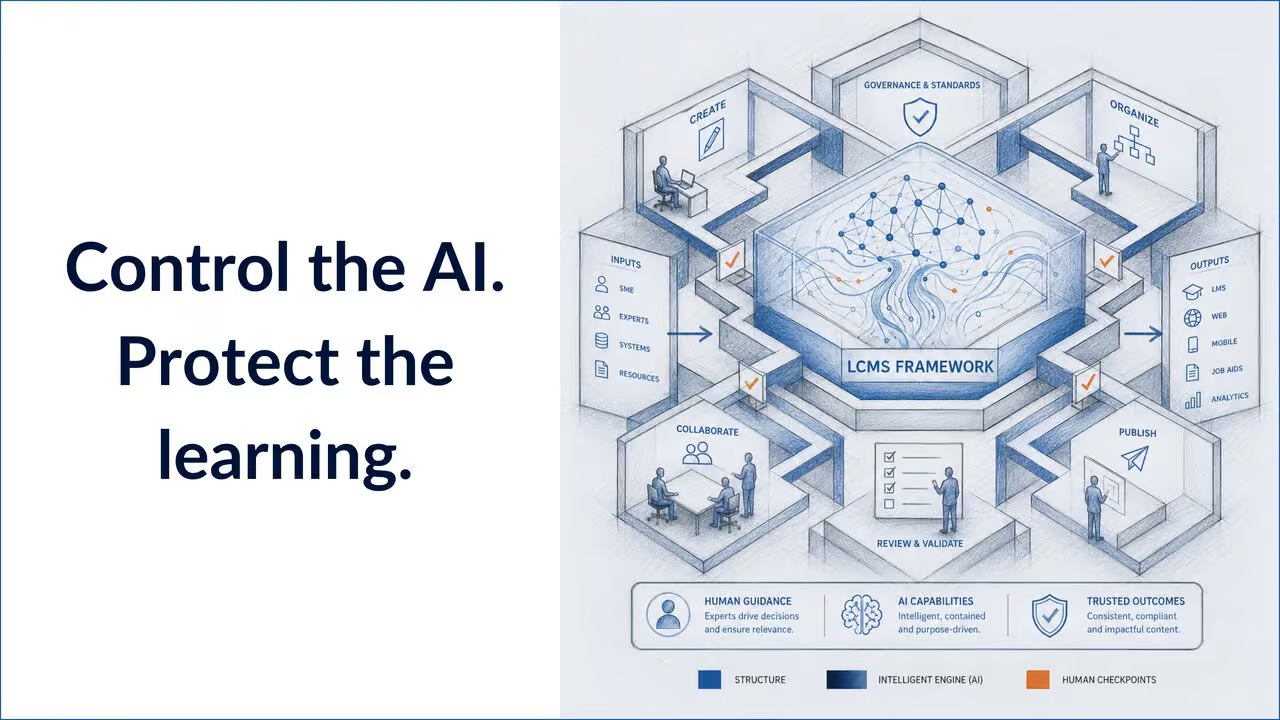
AI Is Moving Fast. Is the learning content correct?
AI is no longer a side experiment for learning and development teams.
Instructional designers are using AI to brainstorm learning objectives, draft assessment questions, summarize source content, generate practice scenarios, translate courses, and personalize feedback. L&D leaders are exploring AI to speed up production, reduce repetitive work, and help teams manage more content with fewer resources.
That opportunity is real.
So is the risk.
dominKnow's own research puts a number on that gap. In The State of Learning Content Management 2026, 49% of learning leaders said AI would have a significant to transformational impact on learning content in the next two to three years, but 77% were not completely confident their AI-generated content is properly governed by policy. Adoption is outpacing oversight, and that gap is exactly where risk builds up unnoticed.
When AI enters the learning content workflow, L&D teams are no longer only asking, "Can this help us create faster?"
They also need to ask:
- Who controls the output?
- What happens to our content?
- Can AI-generated material be reviewed before it reaches learners?
- Is our data being used to train AI models?
- How do we keep learning content accurate, compliant, and aligned with our organization's standards?
That is where a clear vendor policy on AI becomes essential.
For L&D teams, this is not just an IT concern. It directly affects instructional quality, content accuracy, brand consistency, learner trust, data privacy, and compliance. If your team is evaluating a Learning Content Management System (LCMS) or authoring platform with AI capabilities, these questions should be part of the buying process from the beginning.
Most vendor demos answer the easy question: what can this AI do? Very few can answer the harder one: how is it controlled?
Below are five questions worth asking any LCMS vendor, along with how dominKnow | ONE answers each one, so you can compare a real model against your own vendor's response.
1. Is AI Optional, or Is It Forced Into the Workflow?
The first question is simple.
Can your team choose when and how to use AI?
AI should support the learning content workflow, not take control of it. Some teams may be ready to use AI for brainstorming, translation, or content review. Others may need to move more slowly because of legal, compliance, security, or internal policy requirements.
An LCMS vendor should be able to explain whether AI features are optional, configurable, and controlled by administrators.
That matters because not every organization has the same risk tolerance. A healthcare organization, financial services company, government agency, or global enterprise may need tighter controls than a small internal training team. Even within the same company, different departments may have different rules for what AI can and cannot touch.
L&D leaders should ask:
- Can administrators enable or disable AI features?
- Can AI access be limited by role, team, project, or feature?
- Can some authors use AI while others work without it?
- Can AI be introduced gradually instead of all at once?
- Can the organization align AI use with internal policy?
This is not a hypothetical concern. According to the same research, nearly two-thirds of organizations (66%) can't get their AI agent to follow even their own content and AI policies once it's switched on.
How dominKnow | ONE Answers This
AI features are opt-in across the platform, giving organizations full control over whether they are enabled at all. This includes features like the AI Translator, which must be explicitly turned on before anyone can use it.
Translation is always initiated by a person. The platform does not trigger it automatically in the background, and it is not a default step in a workflow your team did not choose.
The goal is not to avoid AI. The goal is to make sure it fits your organization's risk model. A responsible LCMS gives your team control over adoption instead of forcing AI into every workflow by default. Check out dominKnow’s Trust Center for more information.
2. Who Stays in Control of AI-Generated Content?
AI can help teams move faster, but it should not become the final authority on learning content.
In L&D, quality still depends on human judgment. Instructional designers, subject matter experts, reviewers, compliance teams, and business stakeholders all play a role in making sure content is accurate, appropriate, accessible, and aligned with performance goals.
That should not change because AI is involved.
When evaluating an LCMS vendor, ask how the platform keeps humans in control. AI-generated content should be treated as a draft, suggestion, or acceleration tool, not as approved learning content by default.
This is especially important for:
- Compliance training
- Safety training
- Product training
- Technical training
- Healthcare or clinical education
- Financial or legal content
- Customer-facing enablement
- Global translation and localization
L&D teams should ask:
- Can authors review and edit AI-generated content before publishing?
- Are AI outputs part of the authoring workflow, not a separate uncontrolled system?
- Can reviewers and SMEs comment on AI-assisted content?
- Is there an approval process before AI-generated content goes live?
- Can teams track review feedback and revisions over time?
More than half of organizations (53%) cannot enforce mandatory human review before AI-generated content publishes, according to the same research. That is not a minor gap. It means a majority of teams have no reliable checkpoint between an AI draft and a live course.
How dominKnow | ONE Answers This
AI-assisted content is not managed in a separate layer outside your control. It sits inside the same single-source structure as everything else in the LCMS, with the same reuse, version control, and update tracking.
That means AI-assisted content can move through the same collaboration and review tools as content your team built by hand. Subject matter experts can review it. Stakeholders can provide feedback. dominKnow's governance model, detailed in the Learning at Scale, Without Compromise webinar, gives this structure teeth: roles like Admin, Lead Author, Author, SME Reviewer, Approver, and Publisher. Each carry distinct permissions, with a separation-of-duties setting that prevents a single person from holding both review and publish authority over the same piece of content. Teams can apply the same sign-off process before anything is published. dominKnow's AI approach is also built to be transparent rather than invisible: customers are informed whenever generative AI tools are used in connection with their content.
The best model here is not AI replacing the team. It is AI helping the team move faster, develop and maintain higher-impact learning, while the team stays in control and accountable for quality.
3. Is Customer Data Protected and Isolated?
Governance is not only about who reviews content. It is also about what happens to the content itself. For many organizations, this is the most important and most sensitive question on the list.
Learning content often includes proprietary information, internal processes, product details, employee data, customer scenarios, compliance policies, and competitive knowledge. Once AI tools enter the workflow, organizations need to know exactly how that information is handled.
Before using AI inside an LCMS, ask the vendor:
- What data is sent to AI services, and what is left out?
- Is customer content used to train AI models?
- Are prompts and outputs retained, and for how long?
- Which AI sub-processors are involved?
- How is data transmitted and protected in transit?
- Is data isolated by tenant or customer environment?
- What happens in on-premise or air-gapped deployments?
These questions should be answered clearly, with specifics, not buried in vague language about "industry-leading security."
How dominKnow | ONE Answers This
dominKnow is SOC 2 Type II attested and maintains compliance with international data protection frameworks, including GDPR and CCPA. Its published AI Security and Privacy Statement states plainly that customer data is never used for AI training purposes, and that AI sub-processors operate under a zero data retention policy, meaning customer data is deleted immediately after an output is generated.
dominKnow also names its AI partners publicly rather than leaving that detail vague: OpenAI and Anthropic support prompt-based AI actions, AWS and DeepL handle translation processing, and LangGraph manages the underlying AI workflows. Every one of those partners is bound by contractual controls that enforce dominKnow's data handling standards.
The AI Translator workflow is a concrete example of what this looks like in practice. Only the specific text needed for translation is exported, which may include course text, interface labels, assessment questions, captions, and transcripts. User credentials, analytics, and system configuration information are not included in that export. The content is structured in XLIFF 2.1 format and transmitted over an encrypted connection, processed by the translation partner, and returned to the customer's dominKnow instance using encryption and machine-to-machine authentication.
For L&D teams, data protection is content protection. If your content is not safeguarded, your learning strategy is not either.
4. Can Teams Review, Approve, and Manage AI Output at Scale?
AI can create content quickly.
That is helpful, but it can also create a new problem: more content to review, approve, update, translate, and maintain.
This is where many teams run into the hidden challenge of AI adoption. Faster content creation does not automatically create better content operations. Left unmanaged, it can make content sprawl worse, not better, if there is no structure around review, versioning, reuse, and publishing.
That is why oversight needs to be connected to the LCMS workflow itself, not managed only as a separate policy document.
L&D teams should ask:
- Can AI-assisted content move through the same review process as other content?
- Can SMEs review specific sections, pages, languages, or versions?
- Can reviewers leave comments and track issues to completion?
- Can teams manage multiple versions of content from one source?
- Can updates be made once and reused across multiple courses or outputs?
- Can AI-assisted translation be reviewed before delivery?
- Can accessibility and brand standards be maintained across AI-touched content?
Most organizations are flying blind on their own AI-generated content, according to the same research. 61% have no visibility into where it is being used, 69% lack centralized control over AI usage policy, and 70% cannot trace version history on AI-assisted changes. Those numbers describe exactly the kind of sprawl unmanaged AI content creates.
How dominKnow | ONE Answers This
Because AI-assisted content lives inside the same LCMS as everything else, it inherits the same controls automatically.
Publishing rules can range from no check at all, to a warning that flags content for a second look, up to a hard block that stops publication until review is complete. That gives review requirements an actual mechanism instead of a general claim that content gets looked at eventually.
Translated content can be reviewed before it goes live. Terminology files can be configured so specific terms translate consistently across every course. Content built or updated with AI assistance still runs through the same version control and reuse system, so a single update can be managed from one source instead of creating scattered, unmanaged copies.
This is not only a theoretical benefit. The Society of Actuaries used a central content library with an integrated review workflow in dominKnow | ONE and cut content review time by 50% and development time by 25%.
A policy can say AI output must be reviewed. The platform needs to make that review practical, and that only happens when AI is connected to structured authoring, review workflows, translation workflows, and publishing controls rather than bolted on as a side feature.
5. Does the Platform Support Responsible Instructional Design?
This is not only a security and privacy question. It is also a learning quality question.
L&D teams should ask whether AI is being used in a way that supports sound instructional design, or whether it simply helps generate more content faster.
That difference matters. On average, nearly half (46%) of all learning content is outdated, inaccurate, or in need of revision, and 45% of organizations say at least half of their content has fallen behind, according to The State of Learning Content Management 2026. AI that only speeds up production without addressing that decay just produces more content headed for the same pile.
AI can help draft learning content, but more content is not always better learning. AI can generate quiz questions, but not every question measures meaningful understanding. AI can summarize source documents, but summaries still need to be checked for accuracy, context, and instructional usefulness.
A responsible approach should support:
- Clear learning objectives
- Accurate source alignment
- Human review
- Useful feedback
- Accessibility
- Inclusive language
- Assessment quality
- Content consistency
- Version control
- Ongoing improvement
The most important question is not, "Can AI create this?"
The better question is, "Does this help learners perform better?"
Danielle Wallace has made a similar point in her Learning Guild article: the speed AI offers can tempt teams to bypass L&D entirely, producing generic, outdated content faster than ever. The risk is not that AI creates weak content on its own. It is that AI's speed makes it easier than ever to skip instructional design altogether.
How dominKnow | ONE Answers This
dominKnow has been public about its approach here. Its AI Security and Privacy Statement describes the company's strategy as human-centered, built so creators can collaborate with AI throughout content development while remaining in full control of the result.
That shows up in practice through the opt-in model, shared review workflows, and the fact that AI is positioned as one more tool inside a structured LCMS process rather than a shortcut around instructional design.
Why This Belongs in the LCMS Conversation
Brandon Hall Group draws a simple line between the two systems most learning teams already own: an LMS manages learners, an LCMS manages content. That distinction is exactly why AI oversight belongs in the LCMS conversation and not only in a legal or IT policy document.
If AI is being used to create, translate, review, personalize, or analyze learning content, that oversight has to be built into the way the content is managed. That is why the LCMS matters.
An LCMS is not just where courses are created. For enterprise teams, it is where learning content is organized, reused, repurposed, reviewed, translated, updated, published, and maintained over time. As AI becomes part of that workflow, the LCMS becomes a critical control point.
This pattern is not unique to L&D. MIT's Project NANDA found that 95% of generative AI pilots at companies fail to reach production. Deloitte's 2026 State of AI in the Enterprise report found that only 21% of organizations planning agentic AI have a mature governance model in place. The specifics differ by function, but the shape of the problem is the same everywhere: adoption is outrunning the structure needed to support it.
The right platform helps teams answer the questions that matter:
- Who can use AI?
- What content can it access?
- Who reviews AI-assisted work?
- How are changes tracked?
- How are translations approved?
- How is terminology managed?
- How is outdated or unapproved content kept from reaching learners?
Without that structure, AI creates speed without control.
With the right structure, it helps L&D teams move faster while protecting quality, privacy, and trust.
A Practical Checklist for L&D Teams
Before choosing or expanding AI capabilities in your LCMS, use this checklist with your internal stakeholders and vendor team.
AI Access and Control
- Is AI optional?
- Can AI features be enabled or disabled?
- Can access be controlled by role or team?
- Can the organization decide which workflows use AI?
- Can AI be introduced gradually based on internal policy?
Human Oversight
- Can authors review and edit AI output?
- Can SMEs and reviewers approve content before publishing?
- Is AI-generated content treated as draft content?
- Can review comments and issues be tracked?
- Can approval workflows be applied consistently?
Data Privacy and Security
- Is customer data used to train AI models?
- Are prompts or outputs retained, or deleted after use?
- What AI sub-processors are involved, and are they named?
- How is data protected during transmission?
- Is tenant data isolated?
- How are on-premise or air-gapped deployments handled?
Content Governance
- Can AI-assisted content be versioned?
- Can updates be managed from a single source?
- Can translated content go through review?
- Can teams maintain terminology, brand, and compliance standards?
- Can reused content be updated without creating unmanaged duplicates?
Learning Quality
- Does AI support learning objectives?
- Can assessment questions be reviewed for quality?
- Does the workflow support accessibility and inclusive design?
- Can AI-generated content be checked against approved source material?
- Does the process help learners perform better, or only create content faster?
Bottom Line
AI can help L&D teams create, translate, review, and manage learning content faster, but speed alone is not the goal. The real goal is to use AI in a way that protects, and improves, learner trust, content quality, and business outcomes, and that starts with asking the right questions before you sign.
Use the checklist above with your team and your vendor. The right LCMS will not simply add AI on top of an old workflow. It will help you use AI responsibly inside the content lifecycle, with the controls, review processes, and structure needed to create learning content your organization can trust.
See how dominKnow | ONE handles this in practice in the AI Security and Privacy Statement, or talk to our team about what a governed AI rollout looks like for your organization.